We are temporarily not accepting orders – please check back soon for updates.
Shoppers: Join our B31 waitlist to be first to know when we’re back.
Retailers: Apply now to list your store for launch.
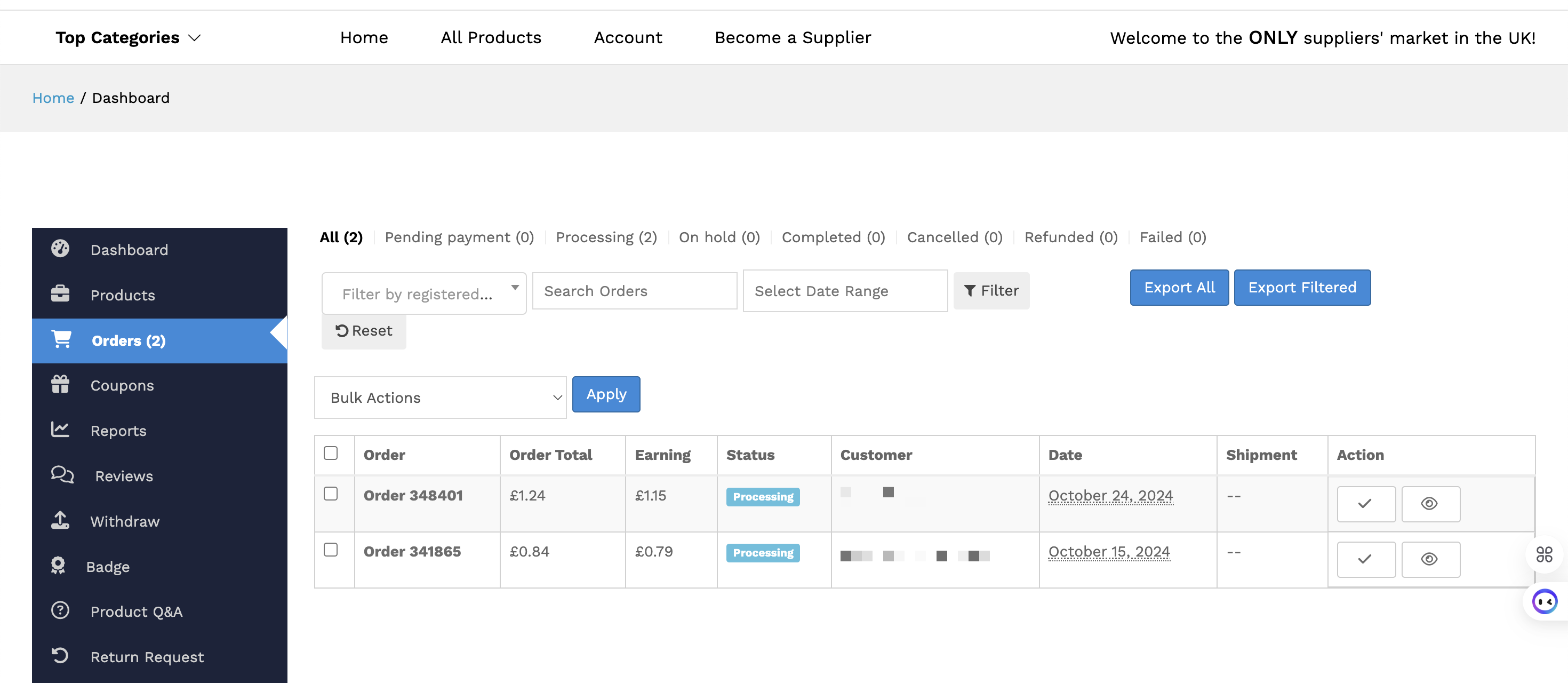
The Orders section on your dashboard is your go-to area for tracking and managing all the orders placed in your store. Follow these steps to efficiently handle your orders:
Step 1: Access the Orders Section
Log in to your supplier account and navigate to the Dashboard.
Click on the Orders menu option.
Here, you’ll see a list of all orders placed in your store, along with their statuses (e.g., Pending, Processing, Completed).
To view the details of a specific order, click on the order in the list.
Step 2: View Order Details
After selecting an order, you’ll be redirected to the Order Details page.
This page contains all the information about the order, including:
Customer details
Products purchased
Order total
Shipping/billing addresses
Order status, and more.
Step 3: Manage and Update Orders
From the Order Details page, you can take necessary actions, such as update the Order Status to reflect its current stage (e.g., Processing, Completed) or add order notes as needed.
These tools help you maintain transparency with your customers and ensure smooth order management.
🎉 That’s it! With the Orders section, you have complete control over tracking and managing all your store’s transactions, making it easy to stay organized and deliver an excellent customer experience.